Use this free online tool to instantly create a Google Docs direct download link. You can convert any shared Google Docs URL into a direct download link for Microsoft Word (.docx), PDF, EPUB, OpenDocument (.odt), or Plain Text (.txt) formats. Share the link or embed it on your website so users can download your document with a single click.
Related Direct Download Generators:
• Google Spreadsheet Direct Download Link Generator
• Google Slides Direct Download Link Generator
• Google Drive File Direct Download Link Generator
• SharePoint Download Link Generator Free Online
How To Create a Google Docs Direct Download Link
You can generate a direct download link for any Google Doc using our online converter above or manually by editing the URL. This allows users to download the file directly to their PC, Mac, or phone in Microsoft Word (.docx) or PDF format without opening Google Docs in a web browser.
Step 1. Set Google Docs General Access Permission
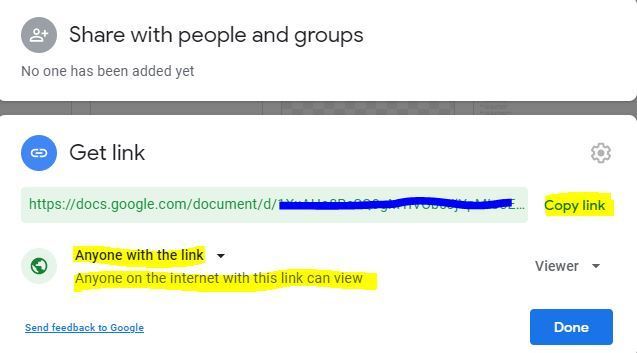
Before a direct download link will work for external recipients, you must grant view access to the Google Doc:
- Open your document in Google Docs.
- Click the Share button in the top-right corner.
- Under General access, change the setting from Restricted to Anyone with the link.
- Ensure the role is set to Viewer.
- Click Copy link and then Done.
Step 2. Generate and Copy the Direct Download Link
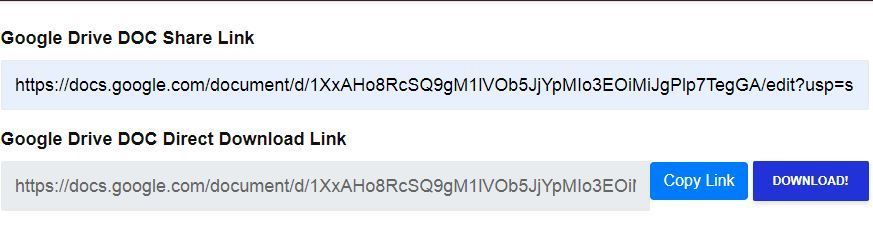
Paste your copied share link into the Google Docs Share Link box in the tool above. Select your preferred target format (Word, PDF, EPUB, or Text), and the tool will instantly construct your direct download URL.
Step 3. Test Your Download Link
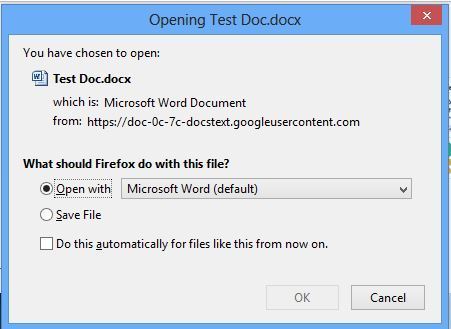
Click Test Download or open the generated link in a new browser tab. Your document will automatically download in your chosen file format.
Manual Method: How Google Docs Direct Download URLs Work
To construct a direct download link manually, replace the /edit?usp=sharing or /view?usp=sharing suffix at the end of the Google Docs URL with the export parameter for your desired file type:
Standard Share Link:https://docs.google.com/document/d/DOCUMENT_ID/edit?usp=sharing
1. Microsoft Word (.docx):https://docs.google.com/document/d/DOCUMENT_ID/export?format=docx
2. PDF Document (.pdf):https://docs.google.com/document/d/DOCUMENT_ID/export?format=pdf
3. EPUB eBook (.epub):https://docs.google.com/document/d/DOCUMENT_ID/export?format=epub
4. Plain Text (.txt):https://docs.google.com/document/d/DOCUMENT_ID/export?format=txt
Frequently Asked Questions (FAQ)
Why does my Google Docs direct download link say “Access Denied”?
If users receive an “Access Denied” or login error, the document’s sharing permission is set to Restricted. Open your Google Doc, click Share, and change General access to Anyone with the link set to Viewer.
Can I create a direct download link to save a Google Doc as a PDF?
Yes! In our generator tool above, select PDF Document (.pdf) or append /export?format=pdf to your document ID URL. Clicking the link will instantly download a compiled PDF version of your Google Doc.
Does downloading a Google Doc via direct link notify the document owner?
No, Google Docs does not send email notifications or alerts to the document owner when a user downloads the file via a direct link.
Will the direct download link stay updated when I edit the document?
Yes. Whenever anyone clicks the direct download link, Google generates a fresh export containing the latest live edits made to your document.
Conclusion
Creating a Google Docs direct download link is a great way to distribute documents, templates, and guides without forcing recipients to open Google Drive or sign into a Google account. Use our free tool above anytime to create instant download links.