Use this free online tool to instantly create a Microsoft SharePoint direct download link. You can convert any shared SharePoint or OneDrive for Business link into a direct download link. Share the URL or embed it on your website so users can download files with a single click without opening the SharePoint viewer.
Related Direct Download Generators:
• Google Spreadsheet Direct Download Link Generator
• Google Drive File Direct Download Link Generator
• Google Slides Direct Download Link Generator
Get SharePoint Link For Direct Download
Step 1. Log in to your Microsoft SharePoint account.
Step 2. Locate your file in your site document library or OneDrive folder.
Step 3. Click the Share button or the three dots (…) next to the file name and select Copy Link.
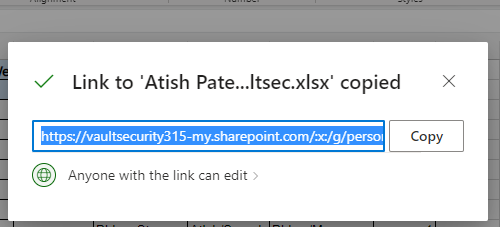
Make sure the sharing permission is set to Anyone with the link or People in your organization with view access so recipients can download the file.
Step 4. Paste the copied link into the SharePoint Share Link box in our generator above.
Step 5. Click Copy Link or Test Download to start downloading immediately.
Manual Method: How SharePoint Direct Download URLs Work
To convert a Microsoft SharePoint or OneDrive share link manually, simply replace or strip any tracking parameters after the main file URL and append ?download=1:
Standard Share Link:https://company.sharepoint.com/:x:/g/personal/user/file_id?e=abcd
Direct Download Link:https://company.sharepoint.com/:x:/g/personal/user/file_id?download=1
Features of SharePoint Download Link Generator
100% Free & No Registration
This tool is completely free with no daily limits, hidden fees, or user sign-ups required.
No Software Installation Required
Works directly in your web browser on desktop, Mac, Android, and iOS devices without installing browser extensions or third-party software.
Fast & Secure Browser-Based Conversion
The conversion is processed client-side in your browser. None of your SharePoint URLs or private file IDs are transmitted or saved on external servers.
Is Downloading SharePoint Files Legal?
Yes. Downloading files via a direct link is completely legal as long as you have authorized permission to view or download the shared content from the file owner or your organization.
Frequently Asked Questions (FAQ)
Why does my SharePoint direct download link ask users to log in?
If a direct download link prompts for a login, the file permission is set to People in your organization or Specific people. To allow public downloads without logging in, change the link permission setting to Anyone with the link.
Does this generator work for both SharePoint and OneDrive for Business links?
Yes. Since Microsoft SharePoint and OneDrive for Business share the same underlying storage architecture, adding ?download=1 works seamlessly for both platforms.
Can I embed a SharePoint direct download link on my website or email newsletter?
Yes! You can use the generated direct download URL in HTML buttons, email links, or blog posts so visitors can download your files with a single click.
Conclusion
Converting a Microsoft SharePoint share URL into a direct download link makes file distribution much smoother for your audience and colleagues. Use our free tool above anytime you need an instant link.